

Details
Download
CLgen
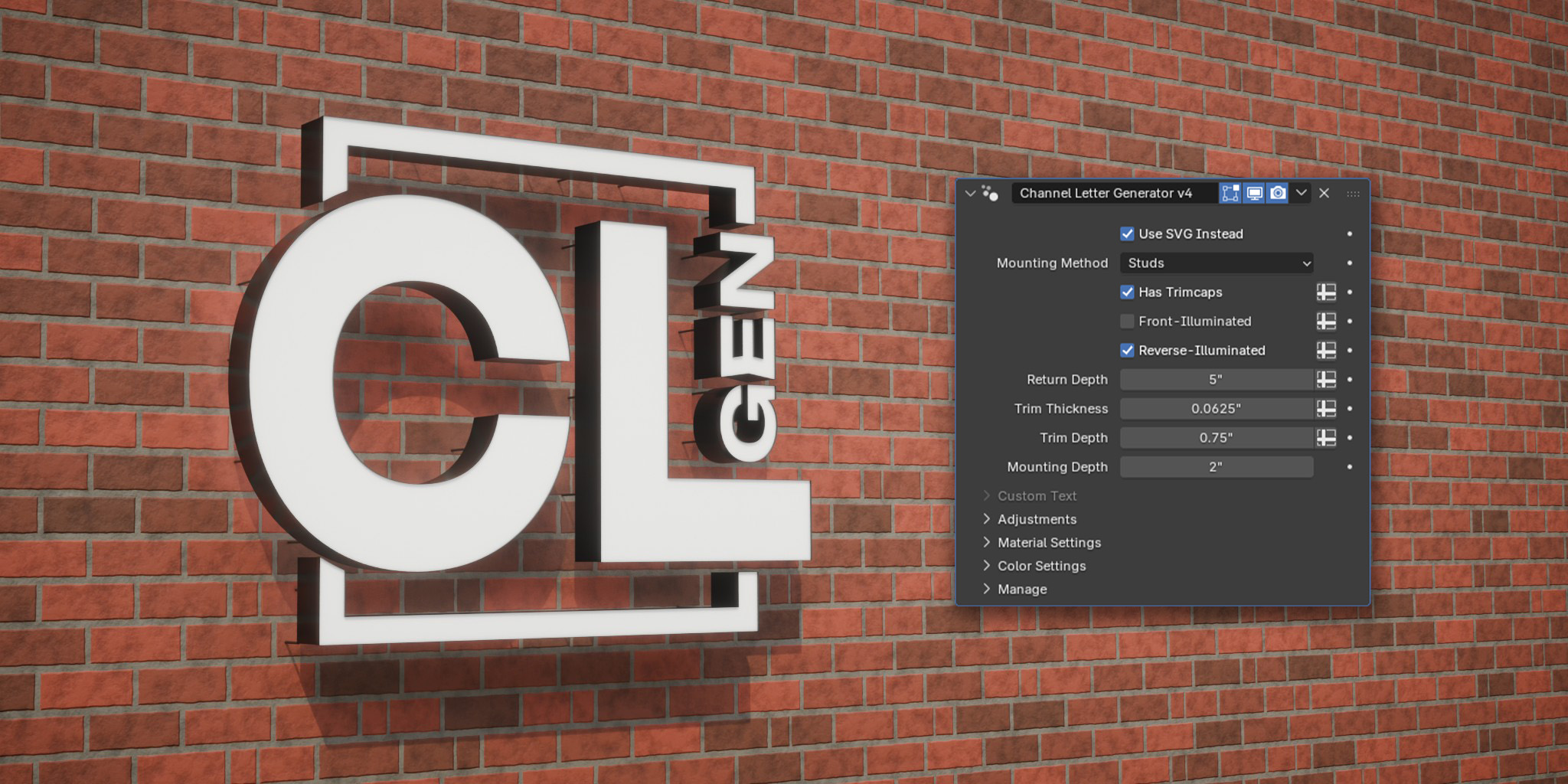

CLgen v4 - Rebuilt From the Ground Up!
CLgen is a geometry nodes tool I made for Blender that procedurally generates channel letters for quick mockup renders to present to clients.
It is capable of generating a wide array of true-to-life channel letters including different mounting methods and illumination methods. Version 4 was rebuilt from scratch to be more convenient and efficient, as well as introducing new features and controls.
Download for free on my Itch.io page: evankurtzart.itch.io/clgen
Made Possible by Vantage Signs
What is a Channel Letter?
Channel Letters are one of the cheapest ways to attract attention at storefronts all over the world. They're real simple things, but very effective at bringing attention to your business.
They're called "channel" letters because they are mostly hollow, being constructed of very thin aluminum walls. These days, the "returns," as they're called (see below for a graphic demonstrating the anatomy of a typical channel letter) are bent by machines, but back in the day this was a specialized craft, requiring a each letter to be bent by hand.

How Does CLgen Work?
CLgen creates and extrudes the different parts of each letter using the curves from font files or imported SVG logos. In truth, this is the simplest part. The bulk of the logic in the tool is dedicated to handling the creation and placement of the various mounting methods.
The simplest overview of the process goes something like this:
- First, the vector curves from either a chosen font file or SVG logo file are used to create the initial flat backer geometry.
- The backer geometry is extruded forward and separated into the face and the returns.
- The returns are duplicated to create the trimcap, which are scaled and offset to be anchored to the front of the letters.
- The trimcap is then extruded to give it some thickness.
- Lastly, the backer geometry is used one way or another to generate mounting hardware.

Node Tree Overview
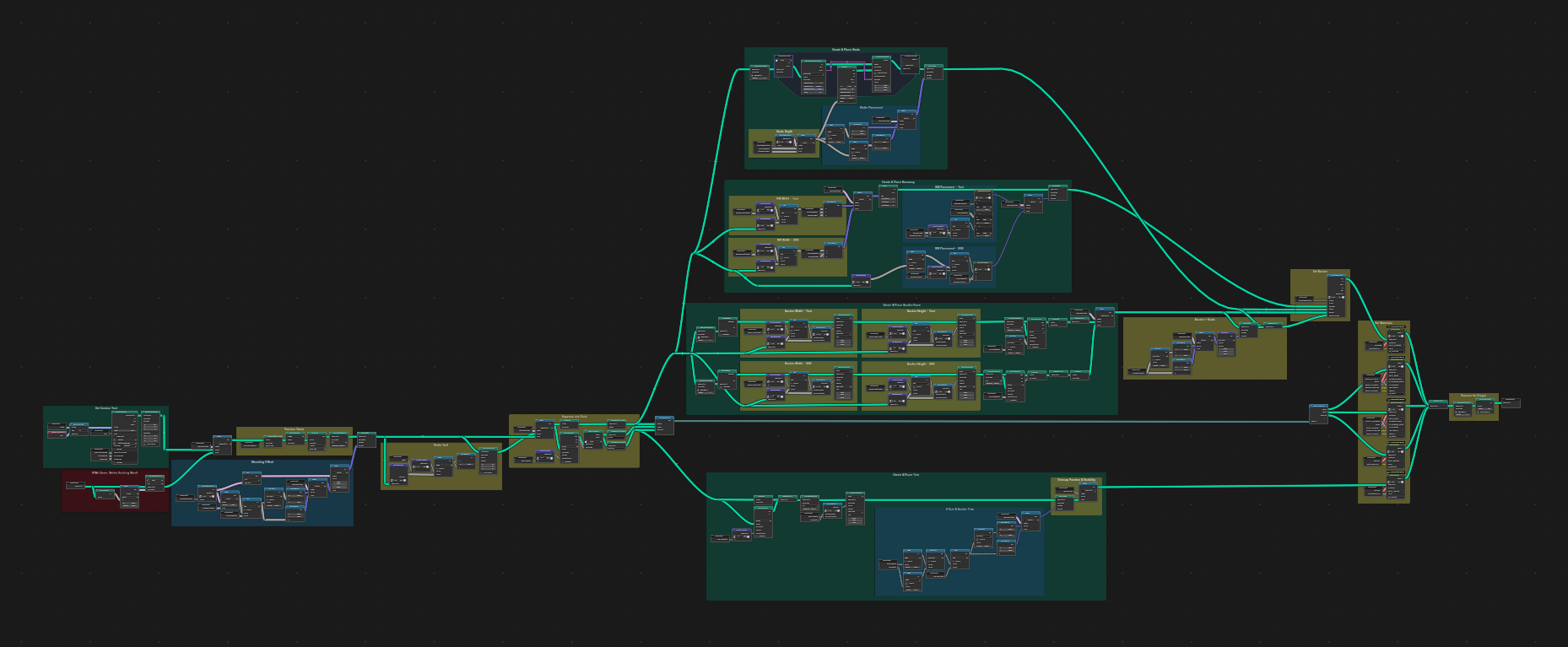
The following is an overview of how CLgen works and how it has changed in v4.
The first thing of note is that none of the top-level logic is obfuscated into groups. Groups are now only used for repeated logic. In previous versions, I used node groups like separate classes in OOP—this is not necessarily how geometry nodes are meant to work. In v4, nodes are laid out sequentially and I took great care to organize them in a way that's easy to follow. I used colored frames to distinguish the roles of specific clusters of nodes, with generation in green, processing in yellow, vector placement and offsetting in blue, and deletion in red.
Initial Nodes
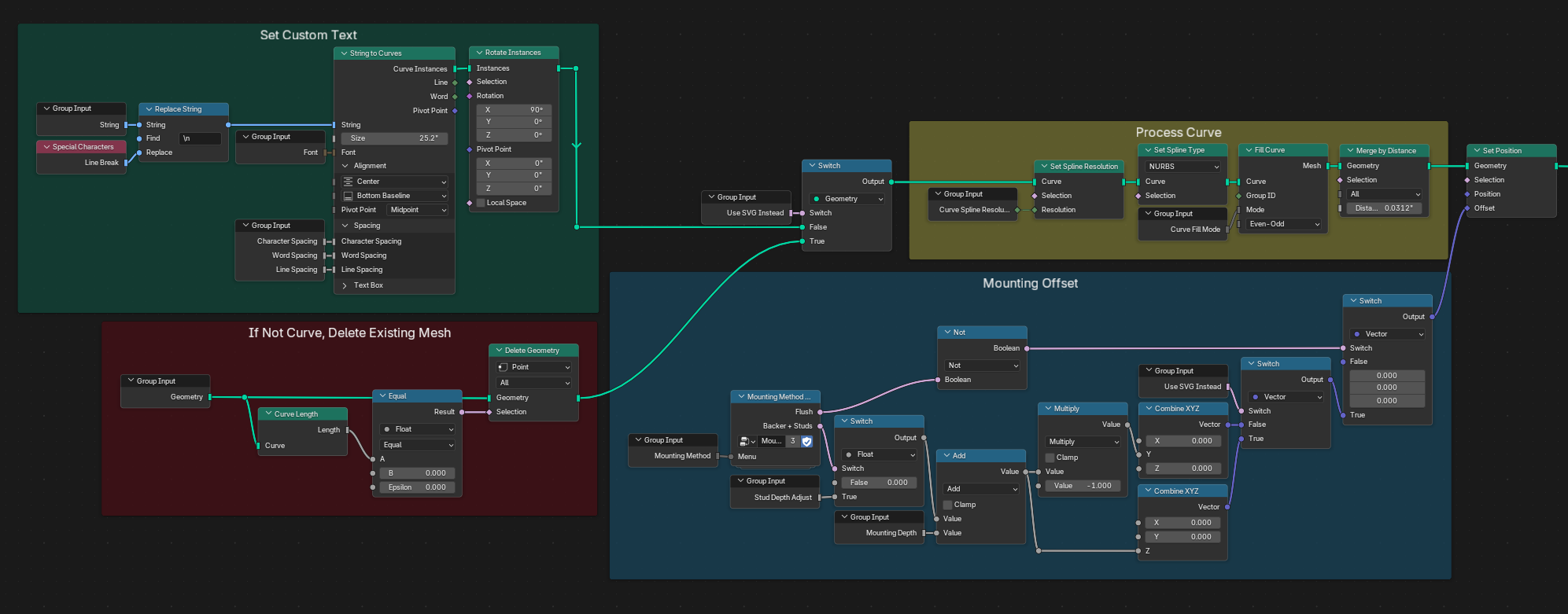
The key difference between v3 and v4 is the consolidation of SVG and Text functions into a singular modifier. New in Blender 5.2 is the ability to apply geometry nodes to empty objects, but the node tree checks to make sure there's no initial geometry on the object the modifier is applied to, just in case.
If you're not using an SVG logo, the curves from a font file are used as the basis for the channel letters. Either way, they need to get processed before they can be used to generate the rest of the letters. It's easier to offset the letters from the wall if you're using a compatible mounting method before generating the rest of the letter parts.
All over the node tree, you'll see Switch nodes used to swap vector directions for SVG logic VS the text. This is because of the way that SVG curves are imported. They are placed flat on the ground facing up, so to speak, and you can't apply the rotation without converting the curves to a mesh. We don't want to do this before applying the modifier, so the node tree needs to apply vector offsets and such differently depending on which format you're working with.
Generating CL Parts
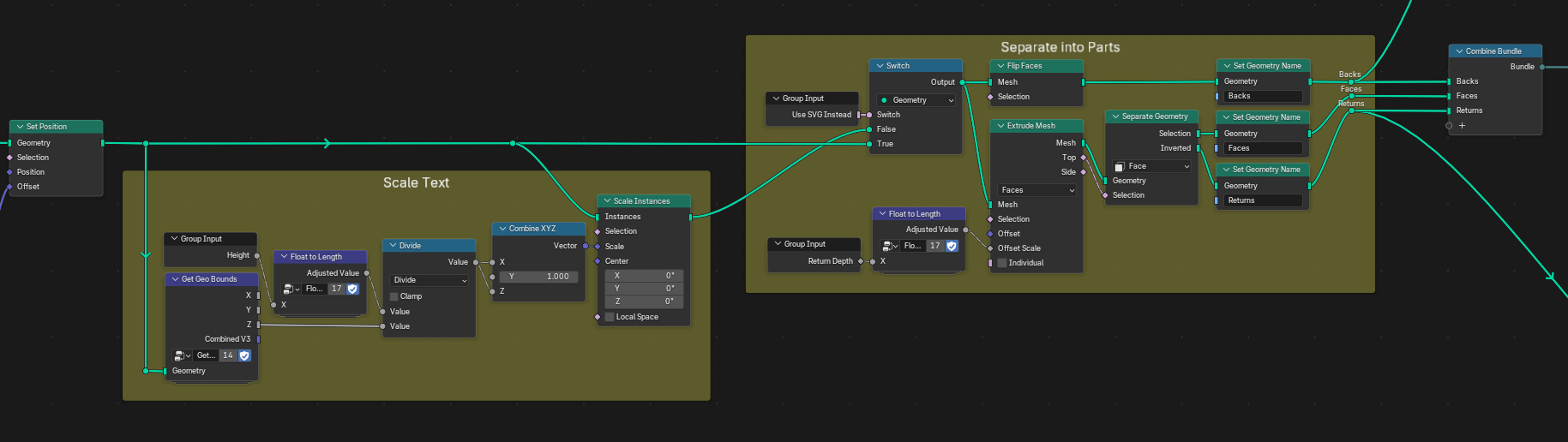
If you're using an SVG logo, you scale that to the size you want it before applying the modifier, but if you're using text, we can handle that within the node tree. The faces and returns are generated from extruding the backs and separating the sides from the tops. The trimcap and mounting methods can be generated from these parts. Though unnecessary, I used a Bundle to clean up the node tree in the next sections, which are the bulk of the logic.
Generating the Trimcap
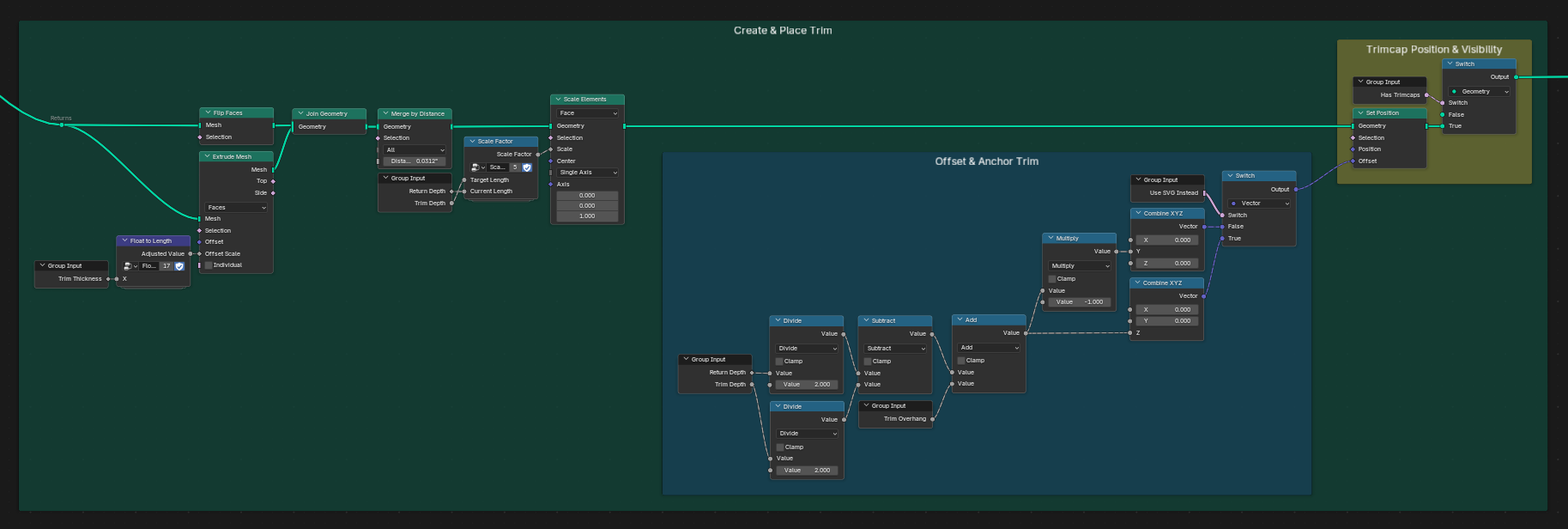
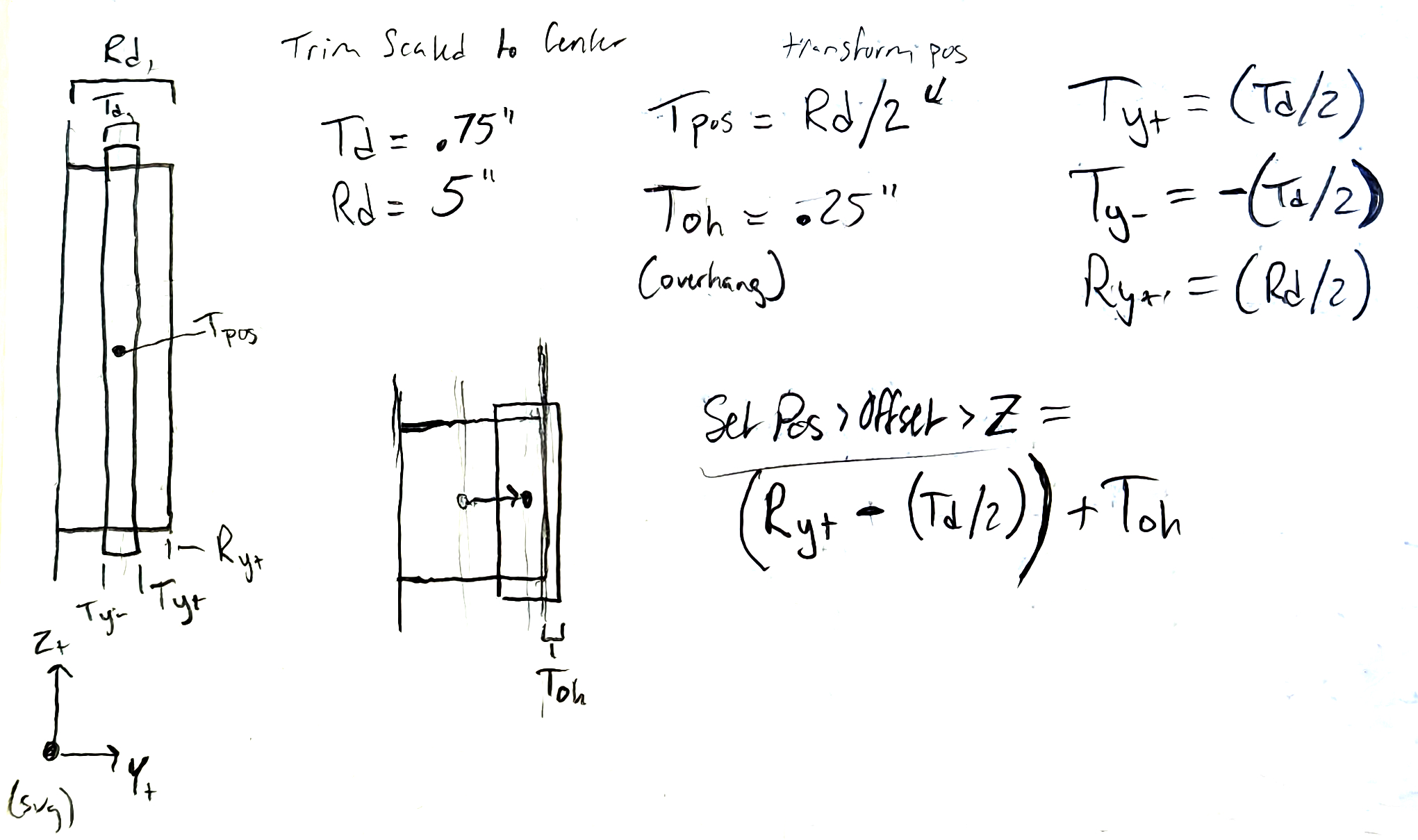
Taking the returns geometry as a base, we extrude the mesh to give it some depth and merge it with the duplicated returns geo. We then scale it down on the Y axis, which puts it in the center of the returns.
To anchor the trim to the front of the letters, we need to offset it. A bit of math later, and we can control how far the trim hangs off the front of the faces. This can be useful if you need to make the trim more noticable without making it thicker. Making it hang off further will allow for more highlights and shadows.
You may notice that the trimcap looks weird or even bad on certain sharp corners. Much to my chagrin, I have been unable to find a good solution to this problem. Unlike in the regular modeling workflow, the Extrude node does not have an Offset Even option, which means it's up to the user to calculate the normals of sharp corners and offset them one-by-one, as well as clamping said offsets to prevent overlap on internal corners. I've tried to learn how to recreate that logic here, but I still can't get it to work for my purposes. If you can figure it out, please let me know.
Generating and Placing a Raceway
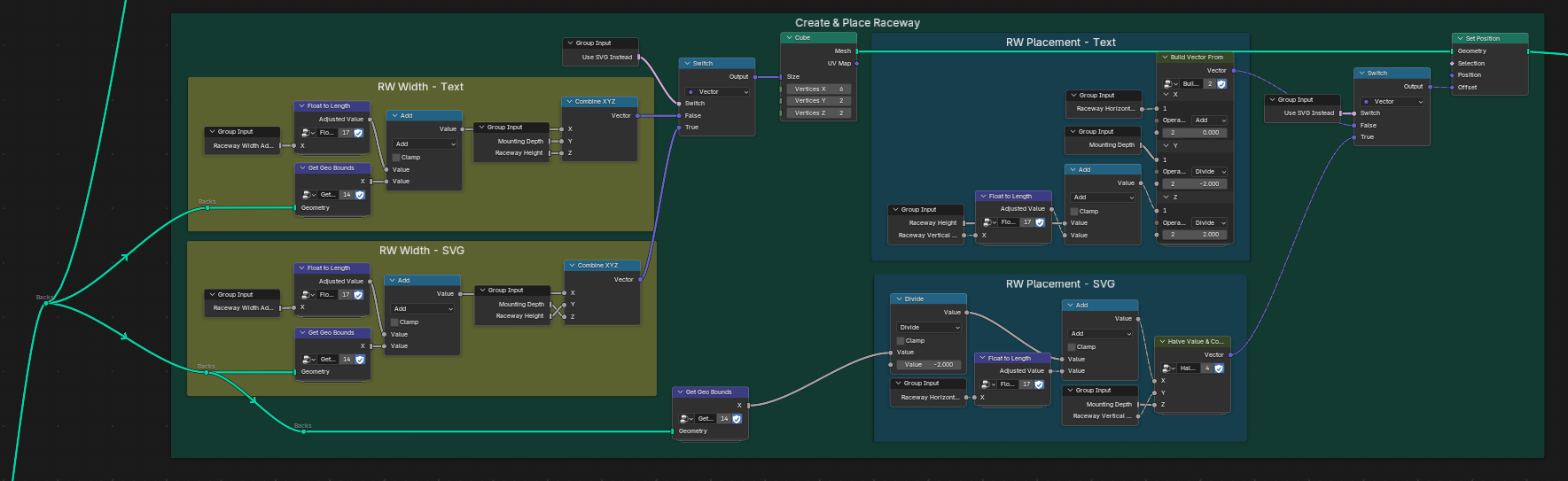
Raceways are a fabricated metal tubing that offset mounted channel letters from the wall. This mounting method is often preferred by landlords because they require fewer holes drilled into the facade of a building. And in the case that the letters are illuminated, they allow for a more remote way to provide power to each letter.
For our purposes, all we need is a single cube, sized to the width of the letters. The bulk of the logic here is just making sure the raceway gets placed according to the rotational value of the input geometry (SVG VS Text).
Generating and Placing Studs
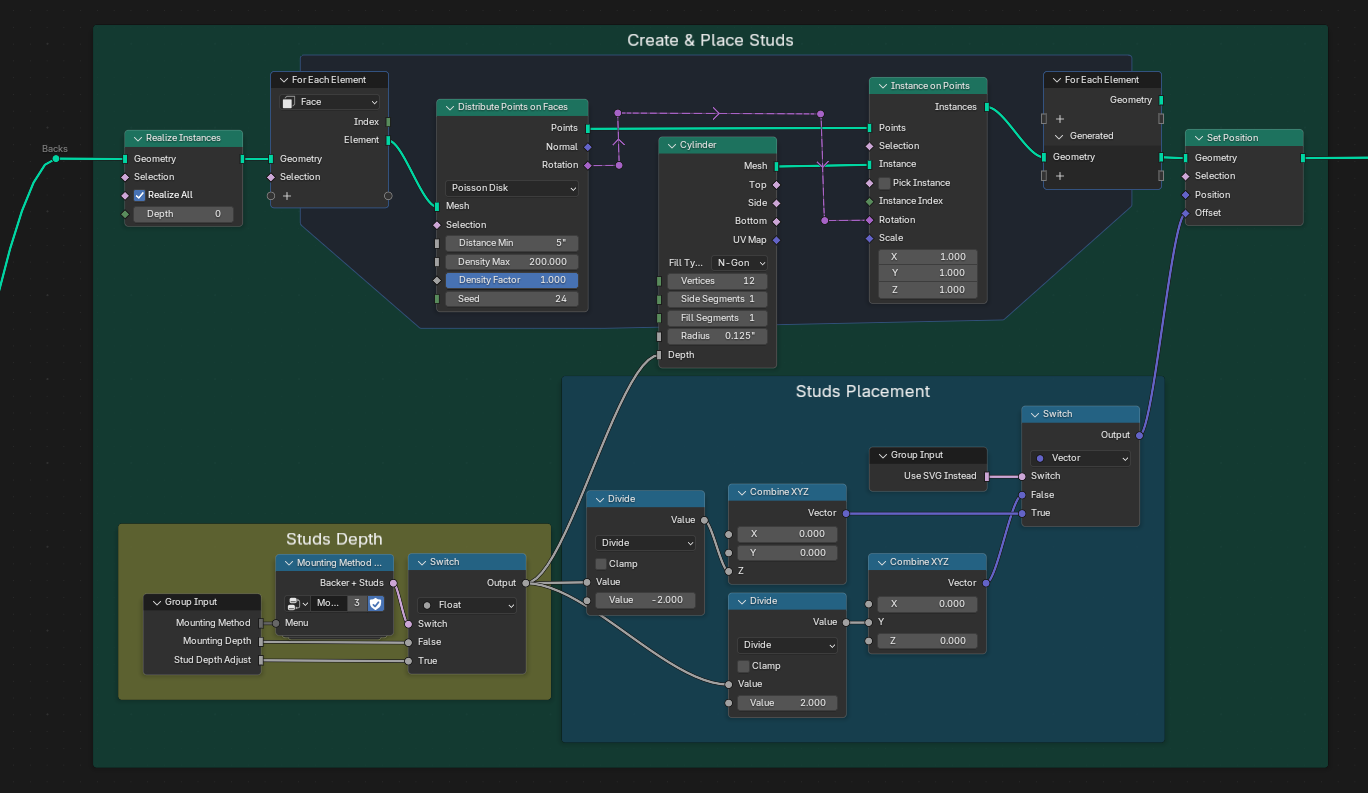
To generate studs, the backer geometry is sampled and cylinders are instanced for each separate letter or closed curve. We will see in a second that we can choose to have a backer panel with studs, so we account for that here before joining the two mounting methods.
In a similar vein as the trimcap offsets, I have also been unable to figure out how to more accurately or neatly distribute studs for this mounting method. Right now, it's simply sampling the backs and generating the studs based on an overall density factor, so smaller letters may not get any studs at all, leaving them floating in the air. This is unfortunate, but I don't know of a better way to do this. Again, if you have any ideas on how to fix this, let me know.
Generating and Placing a Backer Panel
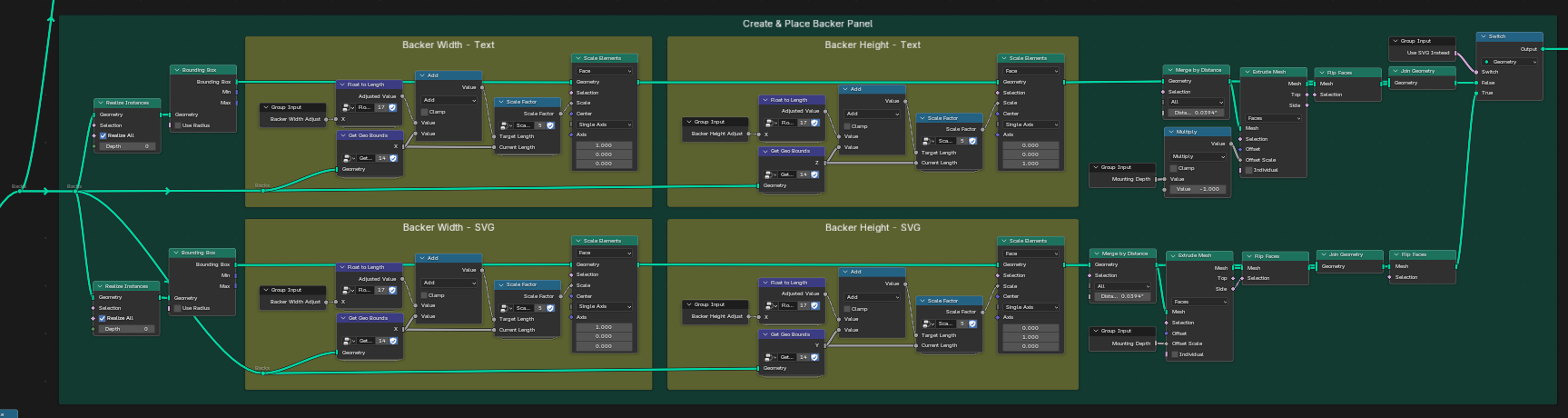
By sampling the width and height of the overall generated channel letters, we can make a cube of that size and allow the user to further influence the size of the resulting backer panel. This is a pretty simple one.
Combining Backer Panel and Studs
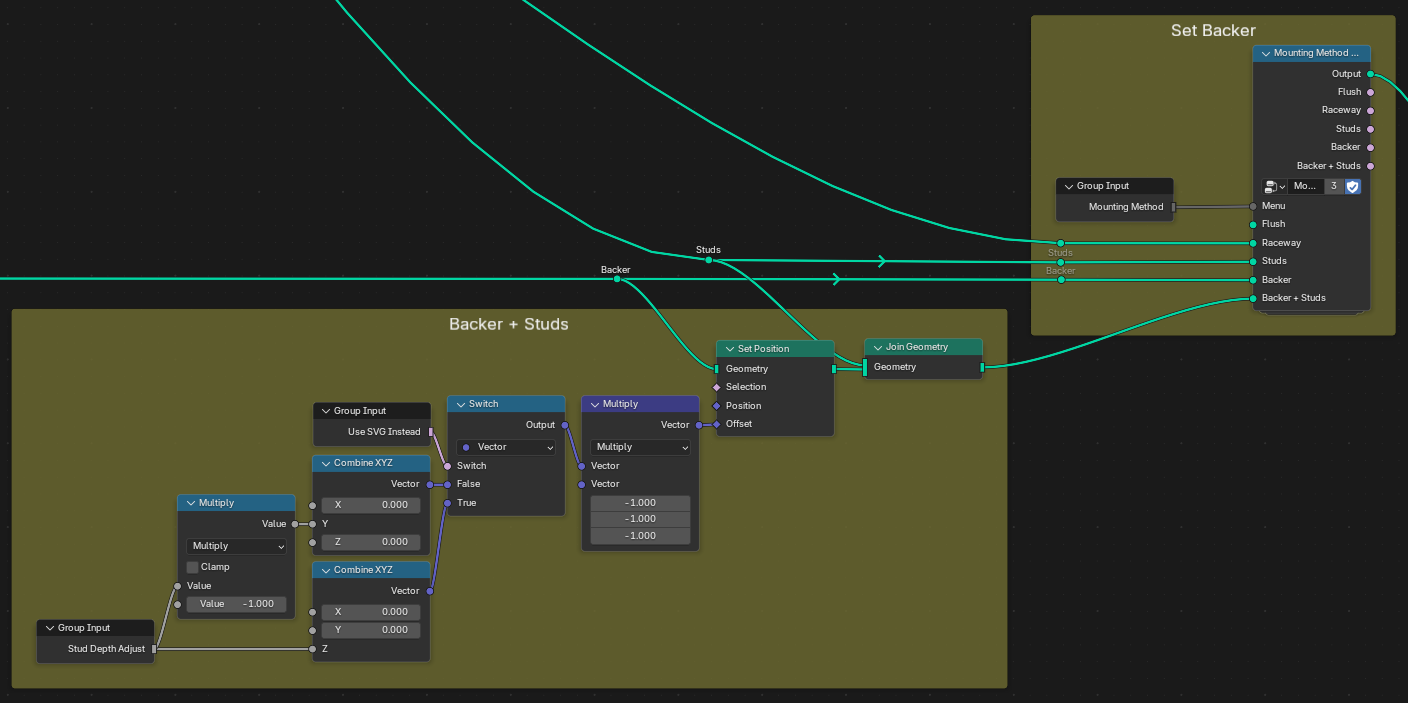
For this mounting method, we are just essentially combining the results of the backer and studs. Though in case the user wants the studs to be a different depth than the backer, we expose a new input socket to adjust the placement independently.
At the end there we can see how we decide what mounting geometry to use based on the input from the user in the modifier panel.
Applying Materials and Processing the Geometry
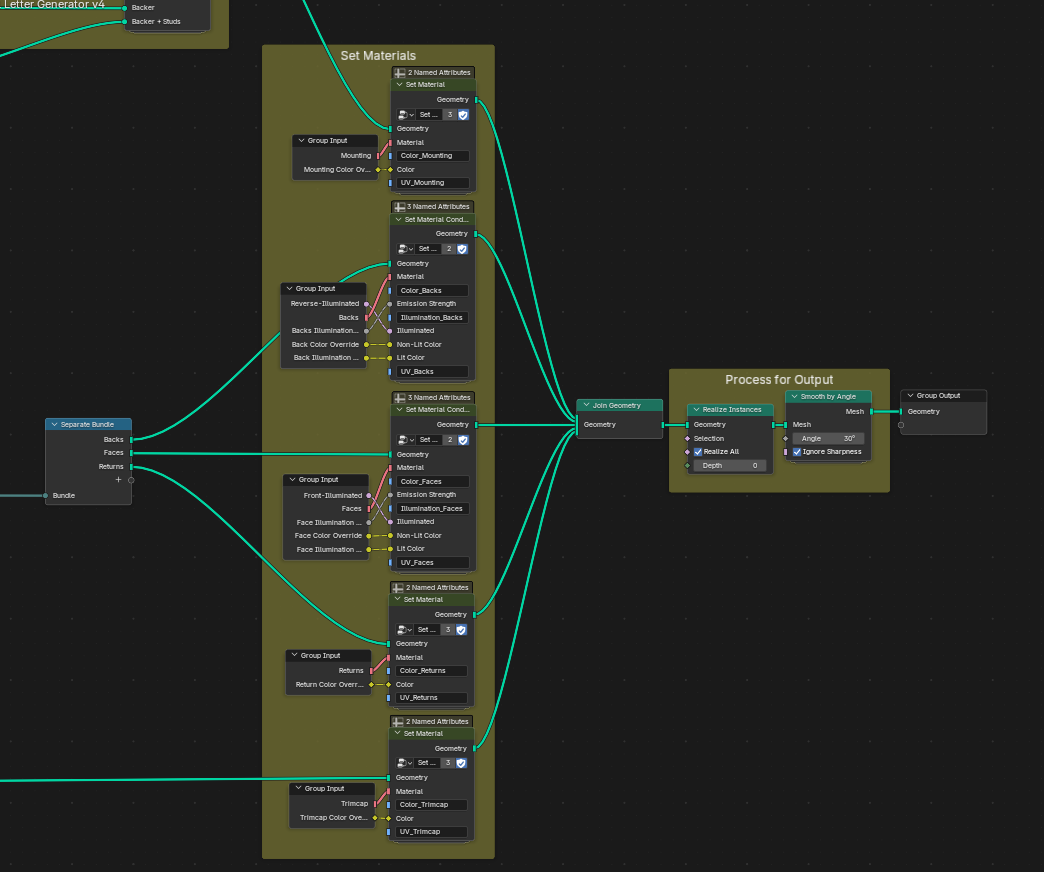
At the very end of the node tree, we set materials for each letter part and set each up for custom settings. Lastly, we join all geometry, realize instances, and apply smoothing before output.
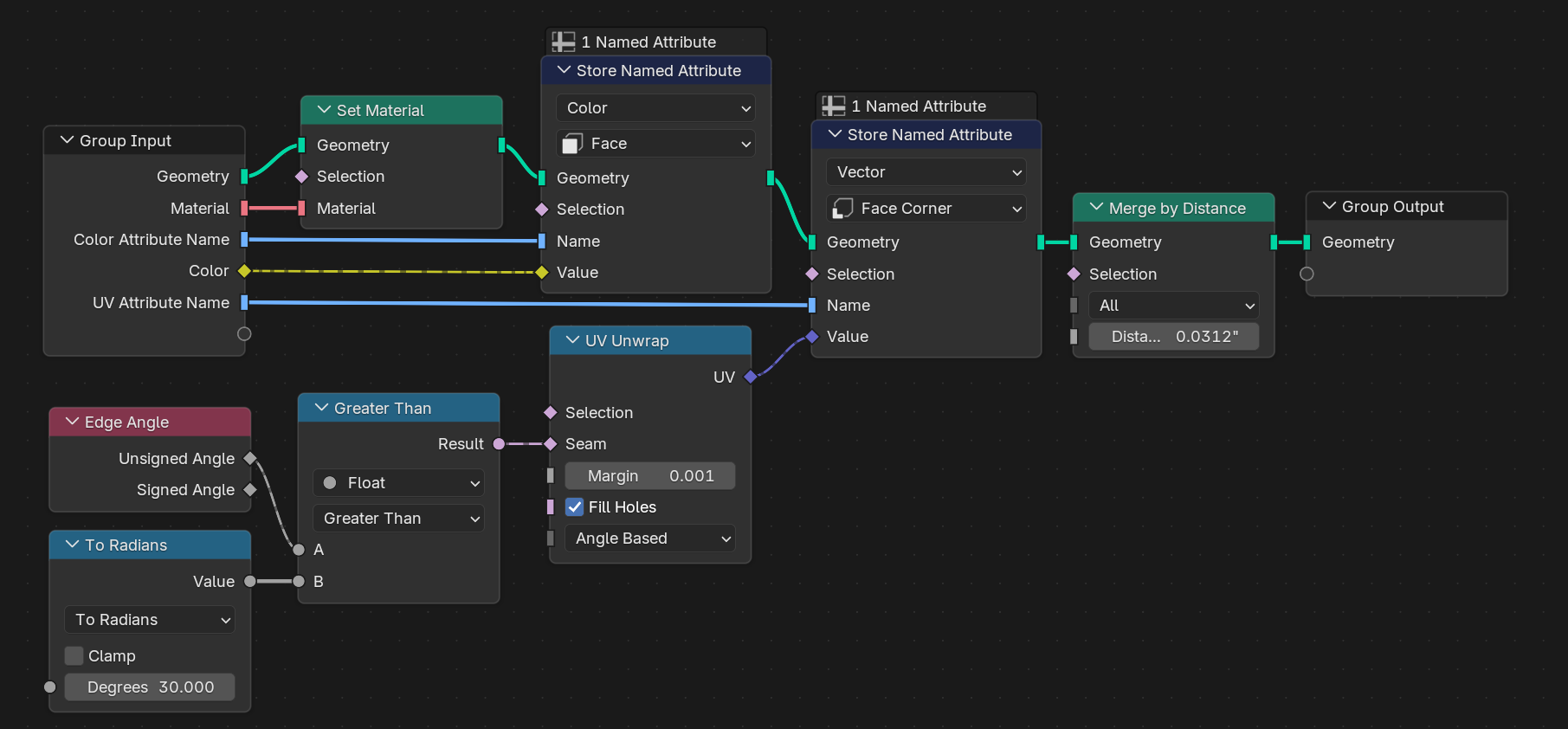
For parts that are not illuminated, we UV unwrap the mesh by sharp corners and set a single material and store some Named Attributes that are used for color and UV controls in the shader editor. Color overrides are exposed to the modifier so that we dont have to use the shader editor to do that.
If you would like to apply a seamless/textured material without first applying the modifier, you will need to add a UV Map node in the shader editor and connect it to the Vector socket of a Mapping node.
You'll then need to enter an attribute name in said UV Map node that corresponds to the letter part you are targeting:
- The naming convention is as follows: "UV_[Part]"
- [Part] in this case can be one of the following: "Mounting" "Backs" "Faces" "Returns" or "Trimcap"
- The UV seams are generated from angles that are more than 30 degrees, so glyphs and shapes that are more curved than angled may not look right.
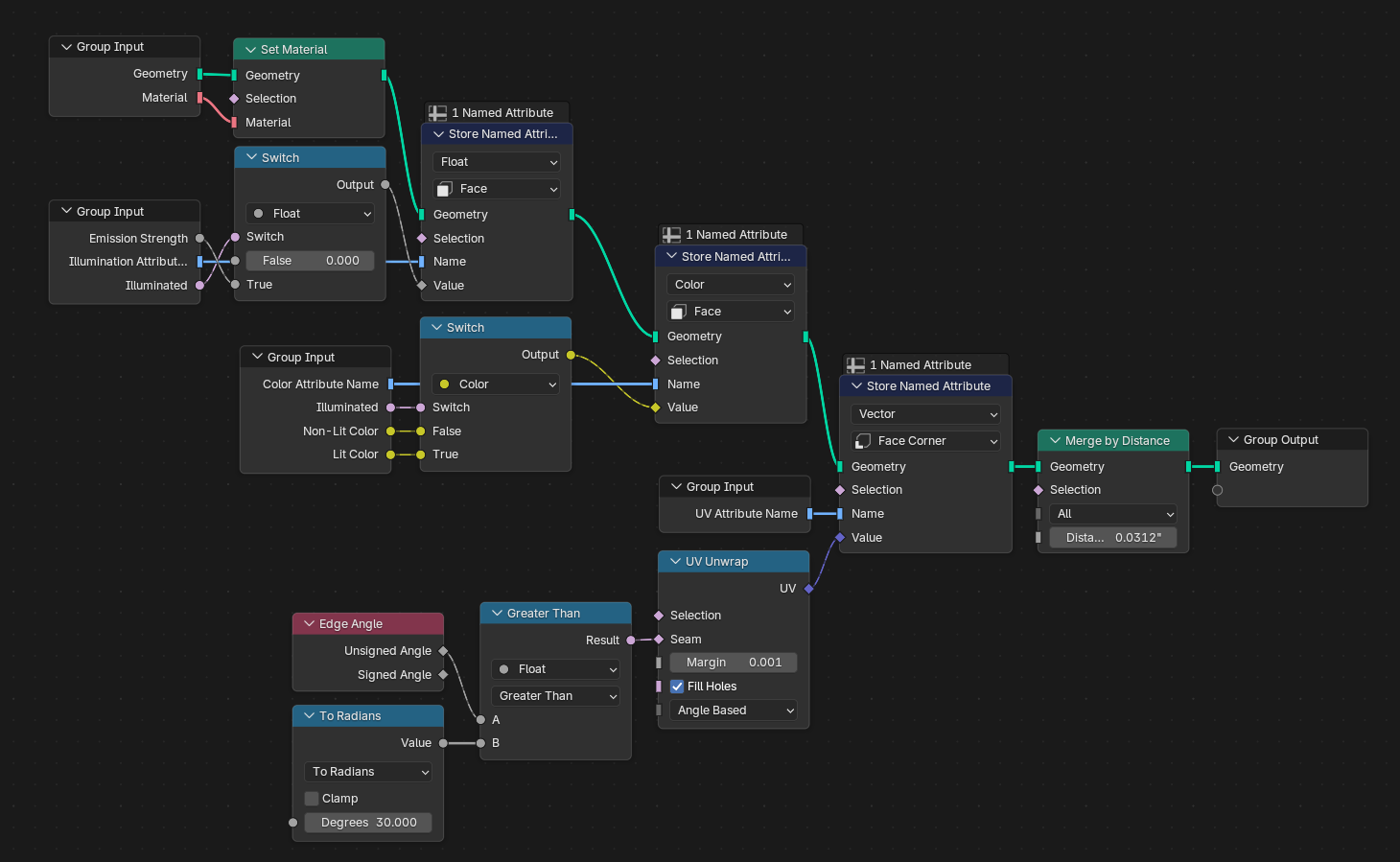
For parts that can be illuminated, we need to switch between materials with emission and those without. You might be able to do this without different materials, but this made more sense to me. Its a lot less of a hastle this way.
Making Logo Cabinet/Cloud/Pill Signs
A lot of modern logos are too complicated to achieve as just contoured letter parts, so they have printed faces and one big channel letter, sometimes referred to as a "cabinet," "pill," or "cloud" sign.
There isn't a way to input an image into the input socket of a modifier (that I know of anyway), and I'm not sure how to manipulate UVs in a way that would make this easy to control from the modifier, so in order to achieve this with CLgen, you will first need to import the outline of the cabinet, then right-click the object in the viewport and Convert it to a Mesh. You will not be able to change any of the settings after this, so be sure to make a copy before converting. After that's done, you can add the image to the face material and mess with the UVs manually.
Thanks!
This geometry nodes tool is available for free! If you feel so inclined to send a donation my way, you can do so here:
